

Top 10 Trending AI Prompts for Men’s Viral Social Media Content and Engaging Instagram Reels
Creating viral social media content for men demands more than just a good photo—it requires a concept that stops the scroll. This curated collection of ten trending AI image prompts is designed to deliver exactly that, blending high-end fashion, cinematic storytelling, and photorealistic detail into every frame. Whether you are crafting an Instagram carousel, a YouTube thumbnail, or a Reel cover, these prompts provide the blueprint for visuals that feel both aspirational and authentic.
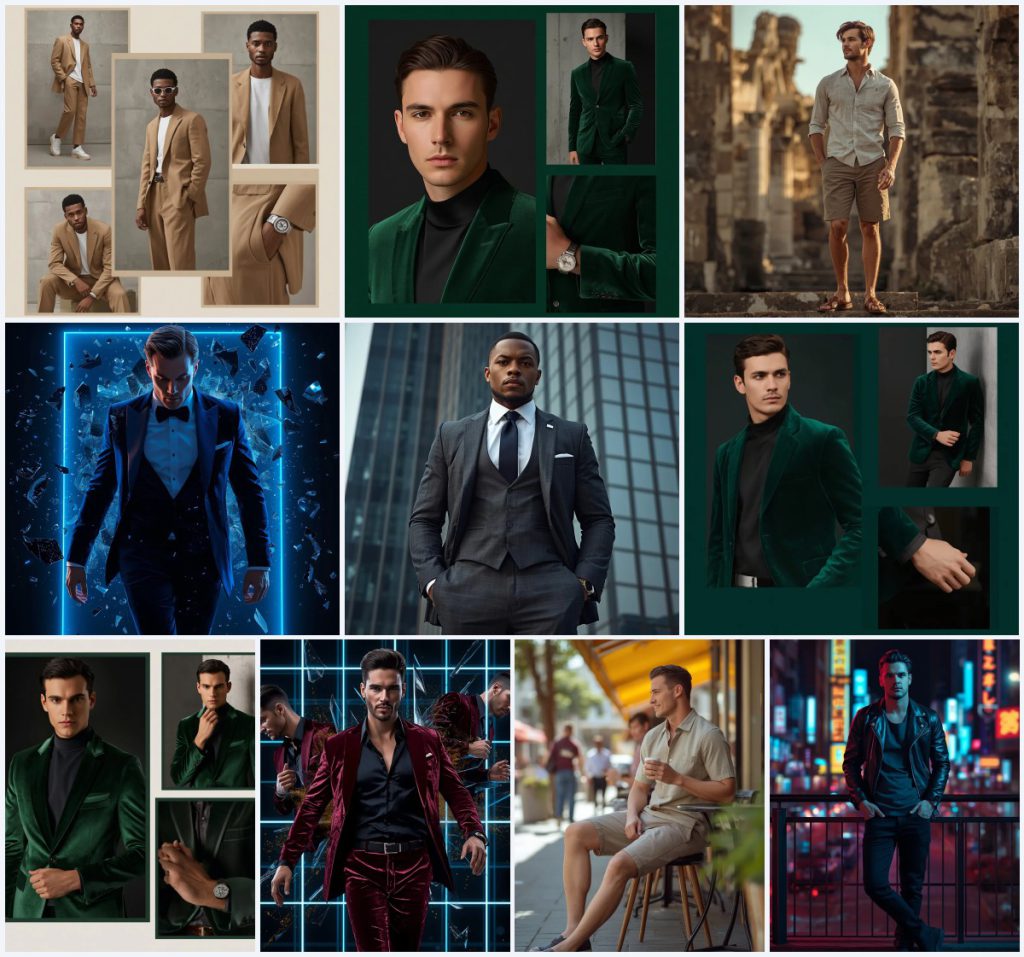
From editorial collages in oversized designer suits to screen-breakout compositions in velvet tuxedos, each prompt in this set pushes the boundaries of AI-generated imagery. They share a common thread: a handsome male model as the focal point, set against minimalist studios, ancient ruins, neon cityscapes, or corporate towers. The result is a versatile library of ultra-HD scenes that can elevate any personal brand or content strategy.
What this men's viral content prompt collection is asking for
This collection asks the AI to generate a series of distinct, photorealistic portraits of a stylish man, each tailored for maximum social media impact. The core request is for high-end, editorial-quality images that emphasize fashion, mood, and setting. The AI must interpret detailed descriptions of clothing, poses, lighting, and backgrounds to produce 8K visuals with ultra-realistic skin texture and cinematic lighting.
- A handsome male model as the consistent subject across all prompts.
- Specific, high-fashion garments like an 'oversized sand-colored designer suit' or a 'tailored emerald green velvet blazer.'
- Precise poses, such as 'a relaxed street-style walk,' 'an intense direct gaze,' or 'a powerful forward step.'
- Detailed backgrounds ranging from a 'minimalist concrete studio' to 'an ancient ruin... bathed in warm, golden hour sunlight.'
- Technical camera and lighting cues including 'shallow depth of field,' '35mm lens,' 'cinematic neon blue and warm white lighting,' and '8k resolution.'
- Post-production and compositional styles like 'sharp rectangular layouts with minimalist beige borders' for collages and 'shattered glass shards' for dynamic breakouts.
A closer look at the visual scene
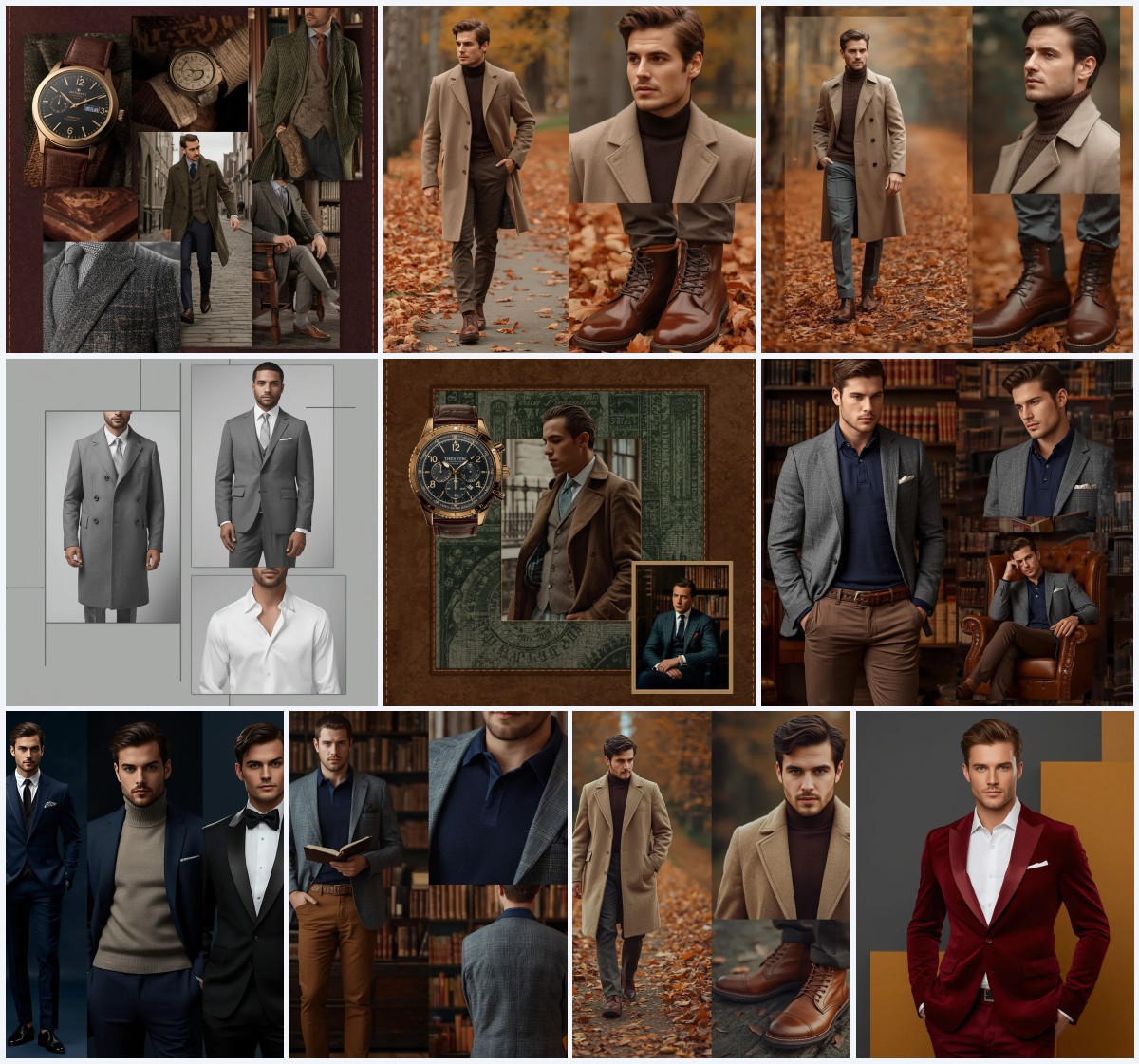
The visual scene is not a single image but a portfolio of moods, each meticulously constructed. In the collage prompts, the scene is a curated set of frames that tell a story through repetition and variation. You see a model in an 'oversized sand-colored designer suit paired with a white t-shirt and chunky sneakers' positioned in 'sharp rectangular layouts,' creating a clean, magazine-like spread. The 'minimalist concrete studio background' ensures the focus remains entirely on the fashion and the model's expressions.
The narrative-driven prompts transport the subject into the world. One scene places a 'stylish man' in 'a lightweight linen shirt, tailored khaki shorts' as he explores 'the grand, crumbling architecture of an ancient ruin.' The clause 'his posture is relaxed yet observant, one hand in his pocket, gazing intently at the weathered stone structures' defines the entire atmosphere. Conversely, the screen-breakout art creates a surreal, high-energy scene where the model in a 'custom-tailored dark blue velvet tuxedo' is 'breaking out of a holographic digital screen' with 'shards of glass and glowing blue binary code' suspended in the air, a moment of pure digital disruption.
Why these prompts work for viral engagement
These prompts are engineered for virality because they combine aspirational aesthetics with technically precise instructions that AI models can execute with stunning realism. They tap into proven social media formats—the editorial collage, the lifestyle adventure shot, and the cinematic action portrait—that historically generate high engagement. The detailed clothing and setting descriptions give the AI a clear roadmap, reducing the chance of generic outputs and ensuring every image feels unique, shareable, and professionally crafted.
- High-fashion specificity: Descriptors like 'emerald green velvet blazer' and 'dark blue velvet tuxedo' create a luxurious, clickable aesthetic that stands out in feeds.
- Dynamic compositional variety: The mix of collages, full-body environmental shots, and surreal breakouts provides content versatility for different post formats like carousels, Reels, and static posts.
- Cinematic realism: Keywords such as 'ultra-realistic skin texture,' '8K ultra HD resolution,' and 'HDR' signal a quality that competes with professional photography, boosting perceived value and shareability.
Three visual styles you can extract from this set
While the collection contains multiple prompts, they cluster around three core visual styles that you can use as inspiration for your own variations. Each style is fully contained within the provided prompt texts and can be dialed up or down by emphasizing certain keywords. These are not separate categories but overlapping aesthetics that define the collection's range.
- Editorial Collage: This style uses sharp rectangular frames and minimalist borders to present multiple poses of a model in a single composition, as seen in the sand-colored suit and emerald blazer collages.
- Lifestyle Adventure: This style places the model in a real-world, narrative setting like an ancient ruin or a sunny outdoor cafe, using natural light and a shallow depth of field to create a candid, aspirational feel.
- Cinematic Breakout: This style introduces surreal, high-contrast elements where the model shatters through a digital or neon grid, with floating shards and glowing code, creating a dynamic, video-game-inspired aesthetic.
How to generate these portraits step by step
Generating these images requires a methodical approach to ensure the AI captures every nuanced detail from fashion textures to specific lighting conditions. The process is straightforward but demands attention to the prompt's exact phrasing and, optionally, the use of a reference image to lock in the model's likeness. Follow these steps to move from a text prompt to a polished, viral-ready visual.
- Copy the full prompt text. Select one of the ten prompts, such as the 'Sleek Modern Man in Oversized Designer Suit Collage,' and copy its entire description verbatim.
- Paste into your AI image generator. Open your chosen tool and paste the prompt directly into the text input field without any edits.
- Upload a reference photo for likeness. To maintain a consistent face across images, upload a clear, front-facing photo of a person and use the tool's 'image prompt' or 'character reference' feature.
- Generate the initial image set. Run the generation. For collage prompts, the AI should produce a single image containing multiple framed poses.
- Check hands, face, and the main object. Scrutinize the output for common AI distortions. Ensure fingers are not fused, the face matches your reference, and clothing details like the 'silver cuff links' or 'velvet lapel' are correctly rendered.
- Upscale and refine. Select the best output and use an upscaling feature to achieve the 8K resolution specified in the prompt, then make minor touch-ups if needed.
Choosing the right reference photo
A high-quality reference photo is the secret to making these AI-generated portraits look like a cohesive personal brand shoot. The AI uses the reference to map facial structure, skin tone, and even the subtle expression onto the model in the generated scene. Without it, each generation will feature a different, random face, breaking the illusion of a single subject.
- Use a front-facing portrait with even, diffused lighting to avoid harsh shadows that can confuse the AI's facial mapping.
- Ensure the photo is sharp and high-resolution, clearly showing eyes, nose, and jawline, as these are critical for the 'intense direct gaze' and 'sharp jawline' details in the prompts.
- Choose a photo with a neutral expression and a clean background, similar to the 'minimalist concrete studio background' described, so the AI can easily separate the subject and place him into the new scene.
Best AI tools for this collection
Several AI image generators excel at the photorealistic, high-fashion look required by these prompts. Each tool has a different strength, from text-prompt adherence to raw skin texture detail. The table below compares four accessible platforms, evaluating their typical realism and a specific use case tied directly to a detail from the prompt collection.
| Tool | Access | Typical realism | Useful here for |
|---|---|---|---|
| ChatGPT | DALL·E 3 integration for Plus users | High, with strong prompt adherence | Rendering the complex composition of the 'modern handsome man in velvet tuxedo screen breakout art' with its floating binary code. |
| Google Gemini | Free and paid tiers via Google AI | Moderate to high, good for vibrant color | Capturing the warm, diffused natural light and 'golden hour sunlight' in the ancient ruin exploration scene. |
| Leonardo AI | Freemium web app with daily tokens | Very high, especially with Alchemy and photo-real models | Achieving the 'ultra-realistic skin texture' and 'shallow depth of field' specified in the outdoor cafe prompt. |
| Midjourney | Paid subscription via Discord | Exceptional, industry-leading for aesthetics | Perfecting the 'high-end editorial' look and the detailed texture of the 'emerald green velvet blazer' in the collage prompt. |
Three tips for better results
Small adjustments to your workflow can dramatically improve how well the AI interprets these fashion-forward prompts. The key is to reinforce the material and environmental details that give each image its premium feel. These tips use specific elements from the prompts to guide you.
- Emphasize fabric textures by adding a weight term like '--stylize 250' in Midjourney or '(velvet texture:1.2)' in Stable Diffusion-based tools to make the 'emerald green velvet blazer' look rich and tactile.
- Use a negative prompt to remove shiny, synthetic skin. Adding 'plastic skin, wax figure, smooth texture' will push the AI toward the 'ultra-realistic skin texture' specified for the leather jacket city scene.
- For the collage prompts, if the AI generates separate images, use the '--repeat' or 'batch' function to create multiple poses, then manually assemble them with 'sharp rectangular layouts' in a photo editor to match the prompt's intent.
Common issues and quick fixes
Even with detailed prompts, AI image generators can misinterpret instructions or produce flawed details. The table below addresses the most frequent failures you might encounter with this specific collection of men's fashion and lifestyle prompts, offering direct solutions to salvage your generation.
| Issue | What to change |
|---|---|
| The collage output is a single, uncropped photo instead of multiple framed poses. | Add 'split into three separate square frames on a single canvas' to the beginning of the prompt or use an outpainting tool to create borders. |
| The model's hands in the 'one hand in his pocket' pose for the ancient ruin scene are distorted or fused. | Append 'perfect hands, detailed fingers' to the positive prompt and increase the image resolution to give the AI more pixels to work with. |
| The 'chunky sneakers' in the oversized suit collage appear as generic, unidentifiable shoes. | Replace 'chunky sneakers' with a specific brand style like 'white leather Alexander McQueen-style oversized sneakers' to guide the AI more concretely. |
| The 'shards of glass and glowing blue binary code' in the screen breakout art look like flat stickers instead of 3D objects. | Add motion and depth cues such as 'dynamic motion blur on glass shards, volumetric lighting on binary code' to integrate the elements into the scene. |
Frequently Asked Questions
Can I use the same face across all ten prompts in this collection?
Yes, and it is highly recommended for building a consistent personal brand. Upload the same reference photo into your AI tool for each generation. Most platforms have a 'character reference' or 'image prompt' feature that will map the facial features from your photo onto the model in the generated scene, ensuring the handsome man in the emerald green velvet blazer is recognizably the same person exploring the ancient ruin.
Why does my AI-generated velvet blazer look like cotton?
This is a common texture rendering issue. The AI may not fully understand the material property of 'velvet' without additional context. To fix this, add descriptive texture keywords to the prompt, such as 'soft, plush velvet fabric with a subtle sheen and deep shadows in the folds.' You can also use a tool like Leonardo AI with its Alchemy feature, which is particularly good at rendering realistic fabric textures.
How do I turn these prompts into an engaging Instagram Reel?
Generate all the images first, ensuring a consistent face. Then, use a video editing app to create a sequence. Start with a close-up detail shot, like the 'silver cuff links,' and cut to the full-body 'powerful forward step.' Overlay the video with trending audio and use a quick zoom transition between frames. The cinematic breakout art with its 'glowing blue binary code' makes for an excellent, eye-catching Reel cover frame.
Conclusion
This collection of ten trending AI prompts offers a complete visual toolkit for any man looking to dominate social media with high-end, ultra-HD content. From the crisp lines of an editorial collage to the atmospheric storytelling of a golden-hour ruin exploration, each prompt is a starting point for creating a polished, professional online presence. By carefully following the generation steps, using a consistent reference photo, and applying the targeted tips for materials like velvet and leather, you can produce a stunning, cohesive portfolio that captures attention and drives engagement.
Once you have your generated images, use a photo editor to fine-tune colors and crop into the perfect aspect ratio for your platform, ensuring you have the legal right to edit and post the final visuals.